It was a great evening yesterday as everyone loved it, it seems... :-)
This was my third speaking event for our user group.
My last talk was about Delegates and I know most of them did not get anything from what I talked. And I was really disappointed. May be the examples I gave was not enough or it did not make the point that I wanted to convey.
But this time, it was different. Although I stumbled for few minutes, I made that up after some time, thanks to the audience.
Wednesday, March 22, 2006


Wednesday, March 08, 2006
Themes and Skins - Part 2
This is a follow up on my previous post on the similarity between Skins/Themes in ASP.NET 2.0 and Styles/CSS in pre-.NET era.
A CSS file looks typically like this:
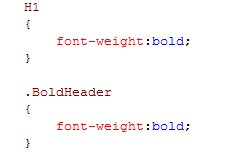
The first notation (H1) is called a Default Style. This is because all the elements with in <h1> tag would be rendered as BOLD.
The second notation (.BoldHeader) is called a Named Style. "Named", as the set of styles have a name. The phrase (word, actually) after the "." is the name given to the style. And any controls (oops! elements, I mean :-)) referring to this name would be rendered as BOLD.
I would not go in-depth, explaining the how-to about implementing themes and skins using CSS, as there are a plethora of articles in the internet.
There is a very interesting article, by Claus Augusti, about implementing Themes using CSS and Javascript. Read on!
Now, lets dive into ASP.NET 2.0. What's different in here? Here we have a .skin file (a file with .skin extension (duh!)), which defines the appearances of the controls that are used in a web page. A .skin file would "look" like an ASPX page. Like this, I mean:
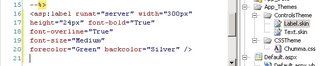
-Label.skin file-
As you see, there is no ID property in the label control. Yes, that is the only difference!
NOTE: There is no intellisense support for .skin files. So, if you need to get it done fast, you need to type it in on an ASPX page and then copy/paste into the .skin file.
Then, when you create an ASPX page, mention this theme (ControlsTheme, as you see in the above snapshot).

-An ASPX page-
So, all the labels in the page would appear as specified in the Label.skin file.
You got the gist, right?
As I posted earlier, I am speaking about the Themes and Skins in ASP.NET 2.0 in our local .NET User Group (Central Penn .NET User Group) meeting on March 21.
A CSS file looks typically like this:
The first notation (H1) is called a Default Style. This is because all the elements with in <h1> tag would be rendered as BOLD.
The second notation (.BoldHeader) is called a Named Style. "Named", as the set of styles have a name. The phrase (word, actually) after the "." is the name given to the style. And any controls (oops! elements, I mean :-)) referring to this name would be rendered as BOLD.
I would not go in-depth, explaining the how-to about implementing themes and skins using CSS, as there are a plethora of articles in the internet.
There is a very interesting article, by Claus Augusti, about implementing Themes using CSS and Javascript. Read on!
Now, lets dive into ASP.NET 2.0. What's different in here? Here we have a .skin file (a file with .skin extension (duh!)), which defines the appearances of the controls that are used in a web page. A .skin file would "look" like an ASPX page. Like this, I mean:
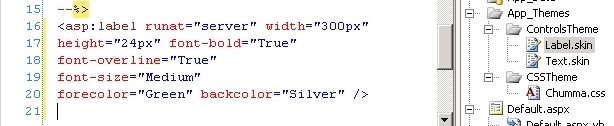
-Label.skin file-
As you see, there is no ID property in the label control. Yes, that is the only difference!
NOTE: There is no intellisense support for .skin files. So, if you need to get it done fast, you need to type it in on an ASPX page and then copy/paste into the .skin file.
Then, when you create an ASPX page, mention this theme (ControlsTheme, as you see in the above snapshot).

-An ASPX page-
So, all the labels in the page would appear as specified in the Label.skin file.
You got the gist, right?
As I posted earlier, I am speaking about the Themes and Skins in ASP.NET 2.0 in our local .NET User Group (Central Penn .NET User Group) meeting on March 21.
Tuesday, March 07, 2006

Themes and Skins (a.k.a style and CSS :-))
What is a Skin anyways?
Skinning were around pre-.NET, but it was not known as Skins.
When you color a text in your page, you are actually skinning the text. The web gurus abstracted this away into what later came to be known as Styles. Then came CSS (Cascading Stytle Sheets), where you could collect all the styles that you applied to your pages, into one single file. Then there came standards for CSS. This collecting of the styles to one file(.CSS file) was a revolution indeed.
You can relate a style applied to a control in your web page as a Skin and the .CSS file as the Theme of your site.
Themes and Skins - Part 2
Skinning were around pre-.NET, but it was not known as Skins.
When you color a text in your page, you are actually skinning the text. The web gurus abstracted this away into what later came to be known as Styles. Then came CSS (Cascading Stytle Sheets), where you could collect all the styles that you applied to your pages, into one single file. Then there came standards for CSS. This collecting of the styles to one file(.CSS file) was a revolution indeed.
You can relate a style applied to a control in your web page as a Skin and the .CSS file as the Theme of your site.
Themes and Skins - Part 2



Friday, February 24, 2006
March is Mine!
I am going to speak about Themes and Skins in ASP.NET 2.0 in our local .NET user's group (http://www.central-penn.net/) on the third Tuesday of March (21st of March, that is). I have been looking forward to this for a long time. With my busy schedule recently, I have not had enough time to dig deeply into VS2005 and ASP.NET 2.0. And this would give me an excuse to do so.
.NET DAD MEETS .NET DUDE
Oh Yeah!
It was Miguel Castro at our local user group meeting (www.central-penn.net), speaking about building
Web Controls.
It was indeed an interesting session, with Miguel. He was really prepared and was really active. Most of the members in our group are either beginners or are getting into .NET.
As Miguel told (or complained) that building web controls are an area which most developers (or the powers-to-be, for that matter) do not like to swim in. I get complains from fellow developers around of how the DataGrid or LisBox do not give them what they need. Well, if they could see them as just templates rather than a fully blown product for them to use, they could really take the advantage of extending the functionality. My favourite quote - "No one can make the whole world happy. Not even Microsoft." But it does make our life easier. With passion and courage, Miguel showed us that extending the functionality of the existing controls or building a new one from the scratch is not that hard and cumbersome as we think it is.
The most important (and confusing) area is State Management. I got lost in that area and got my doubts cleared with Miguel after the session.
We are really proud for having Miguel with us.
Three Cheers to Miguel.
Three Cheers to Judy.
It was Miguel Castro at our local user group meeting (www.central-penn.net), speaking about building
Web Controls.
It was indeed an interesting session, with Miguel. He was really prepared and was really active. Most of the members in our group are either beginners or are getting into .NET.
As Miguel told (or complained) that building web controls are an area which most developers (or the powers-to-be, for that matter) do not like to swim in. I get complains from fellow developers around of how the DataGrid or LisBox do not give them what they need. Well, if they could see them as just templates rather than a fully blown product for them to use, they could really take the advantage of extending the functionality. My favourite quote - "No one can make the whole world happy. Not even Microsoft." But it does make our life easier. With passion and courage, Miguel showed us that extending the functionality of the existing controls or building a new one from the scratch is not that hard and cumbersome as we think it is.
The most important (and confusing) area is State Management. I got lost in that area and got my doubts cleared with Miguel after the session.
We are really proud for having Miguel with us.
Three Cheers to Miguel.
Three Cheers to Judy.
Subscribe to:
Posts (Atom)
-
Disclaimer: This post has nothing to do with washing or repairing cars. Well, I have been pondering over Managers and Management for lo...
-
Our application started having integration issues early March this year. Did I say that was intermittent? To add to our confusion, we coul...
-
 Yesterday I had this popup on my new Nokia Lumia 800 for a phone update. I connected it my laptop and up came the Zune. I went through the ...